
The dashboard | now faster!
Dear SR Software customers,
Thanks to the improvements to our processes on our booking server, your dashboard is now much faster. Both your lists of future and past reservations are now displayed many times faster. Even large periods of time can now be displayed and evaluated more quickly.
Try it out!
New: The online "Reserve"
Would you like only a certain proportion of your stock to be bookable online? Then the new "Reserve" function is just right for you. Set a percentage of your stock to be held in reserve in the store. This prevents a price group from being completely booked out by online reservations.
The "Reserve" function is particularly useful for items with low stock levels and allows you to always keep some of your stock available in the store. You have the option to adjust the reserve settings for each price group individually: 0% means no reserve, while 10% ensures that at least one item remains in the store as a reserve. You can flexibly adjust the percentage between 0 and 100% to suit your needs. You can find this setting in your Skipline dashboard.
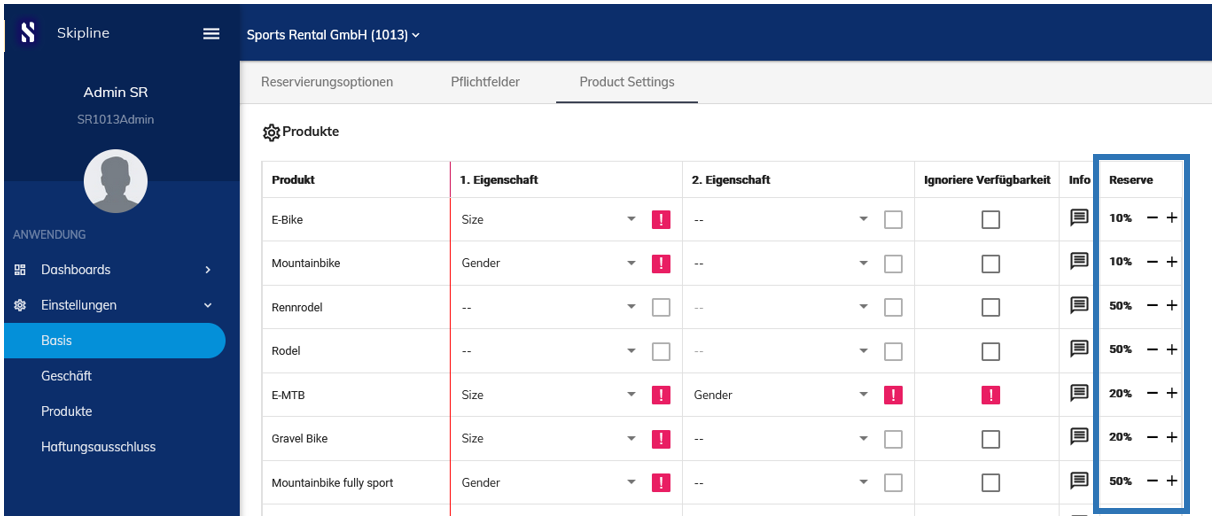
Tips and tricks for the "Reserve" function
Would you like to keep your product range visible but not make it bookable online at the moment? Simply set the "reserve" of the price group to 100%. The price group will then be displayed but marked as "not bookable" online. As soon as you have availability again, you can simply adjust the "Reserve" value.